Detailed copy-paste AI prompts for retail store displays: storefronts, boutique interiors, window displays and product zones. Longer prompts for complex retail scenes.
Retail store displays are more complex than a single room, so their prompts need to be longer and more detailed. A good store-display prompt names the store type, the fixtures and layout, the product zones, the materials and branding feel, the lighting, and the camera — and because a retail scene has more moving parts than a bedroom, the more of that detail you give, the closer the render lands.
Whether it's a storefront, a boutique interior, a window display, or a product wall, the principle is the same: describe the space and how product sits within it. Start from a photo of your actual store (or a model view) so the layout holds, then let the detailed prompt drive the look.
Below are copy-paste prompts built longer on purpose, plus what to include for retail scenes specifically.
What makes a good store-display prompt?
Detail, retail scenes reward long, specific prompts.
For a retail render, name the store type (boutique, flagship, pop-up), the fixtures and layout (shelving, rails, plinths, counters, and how they're arranged), the product zones (where merchandise sits and how it's grouped), the materials and brand feel (warm and premium, clean and minimal, industrial), the lighting (retail leans on layered and accent lighting), and the camera (a wide view to show the space, or a closer one for a display).
This is one case where a longer prompt genuinely helps: a two-line description can't convey a store, so give the AI the full scene.
Which detailed store-display prompts should you try?
Pick the retail scene closest to yours and adjust the details.
- Boutique interior:
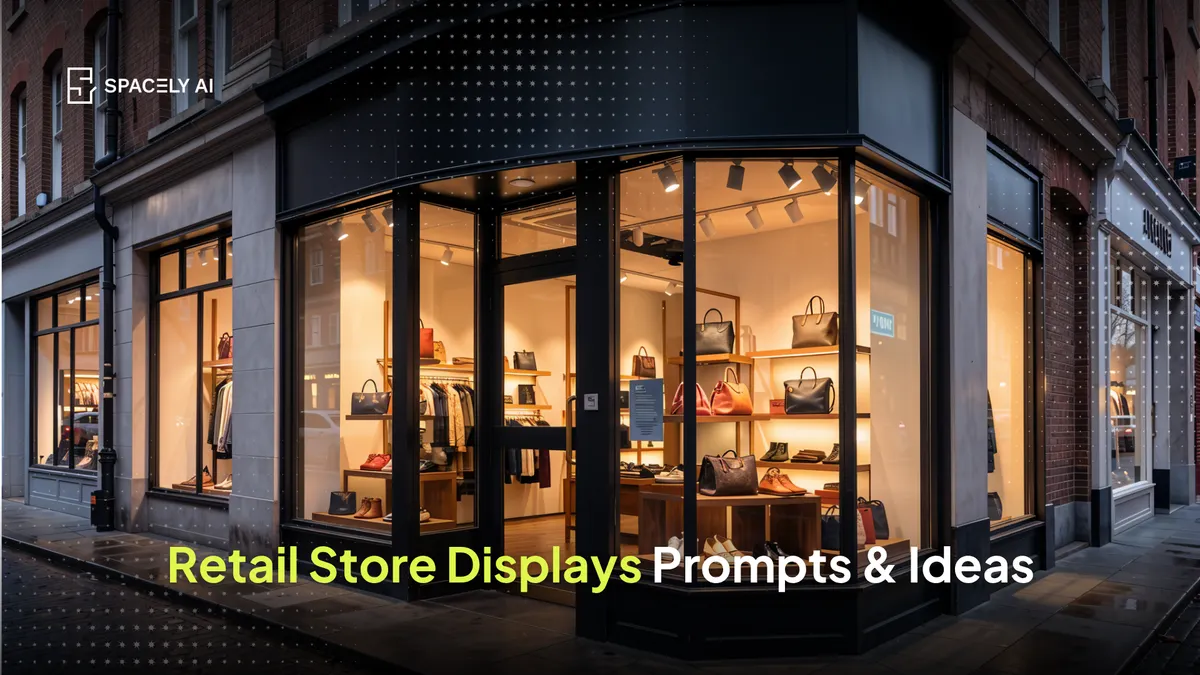
"modern boutique clothing store interior, warm minimal design, oak display plinths and brass clothing rails along the walls, a central table displaying folded product, backlit shelving behind the counter, warm oak floor, layered lighting with accent spots on the merchandise, large storefront window with soft daylight, wide-angle interior photography."
- Storefront / facade:
"premium retail storefront, dark framed glazing, illuminated brand signage above the entrance, a styled window display of the season's products, warm interior glow visible through the glass, evening street setting with soft reflections, eye-level three-quarter view."
- Window display:
"retail window display, seasonal theme, three mannequins on a raised platform, layered props and greenery, focused spotlights on each figure, brand-appropriate colour palette, shot straight-on from the pavement, evening."
- Product display wall:
"retail product display wall, backlit modular shelving in matte black, products evenly spaced and grouped by colour, warm accent lighting, minimal branding, clean concrete floor, eye-level close view."
- Pop-up shop:
"small pop-up retail space, playful modern design, freestanding display units, a bold accent colour on one wall, hanging signage, bright even lighting, product arranged on central tables, wide-angle."
- Flagship / premium store:
"spacious flagship store interior, premium materials, stone floor and warm wood fixtures, generous spacing between displays, sculptural central feature, dramatic layered lighting, tall ceilings, wide-angle architectural photography."
- Café-retail hybrid:
"café and retail hybrid space, warm inviting design, product shelving along one side, seating and a counter on the other, natural materials, soft daylight plus warm pendants, wide-angle."
How do you render a store display from your space?
Start from your store, prompt in detail, refine. Frame a view of your actual store or a model, apply a detailed prompt for the scene you want, and generate. Because retail scenes are busy, expect to refine: adjust the fixtures or lighting in the prompt, and fix a specific display or sign with a local edit rather than regenerating everything.
Starting from your own space keeps the layout and proportions true, so you're visualizing your store, not a generic one — useful for planning a refit, a seasonal display, or a new concept before committing to the build.
FAQ
How do you write an AI prompt for a retail store? Name the store type, the fixtures and layout, the product zones, the materials and brand feel, the lighting, and the camera in detail. Retail scenes have many parts, so a longer, specific prompt lands closer than a short one. Start from a photo of your actual store so the layout stays true.
Why do retail prompts need to be longer? Because a store is more complex than a single room — fixtures, product zones, signage, and layered lighting all need describing. A brief prompt can't convey all that, so a detailed one gives the AI enough to build a believable retail scene.
Can AI visualize my store before a refit or seasonal display? Yes. Render from a photo of your actual store or a model, apply a detailed prompt, and preview a new layout, display, or concept before building it. Starting from your own space keeps the proportions accurate, so you're planning your store rather than a generic one.
More design workflow insights on the Spacely AI blog →
Get started
→ Create your free account
→ Watch the full tutorial on YouTube
→ Explore the member plan
For more information and media inquiries, please contact
Website: spacely.ai
Facebook: facebook.com/spacelyai
Instagram: instagram.com/spacely.ai
Email: [email protected]