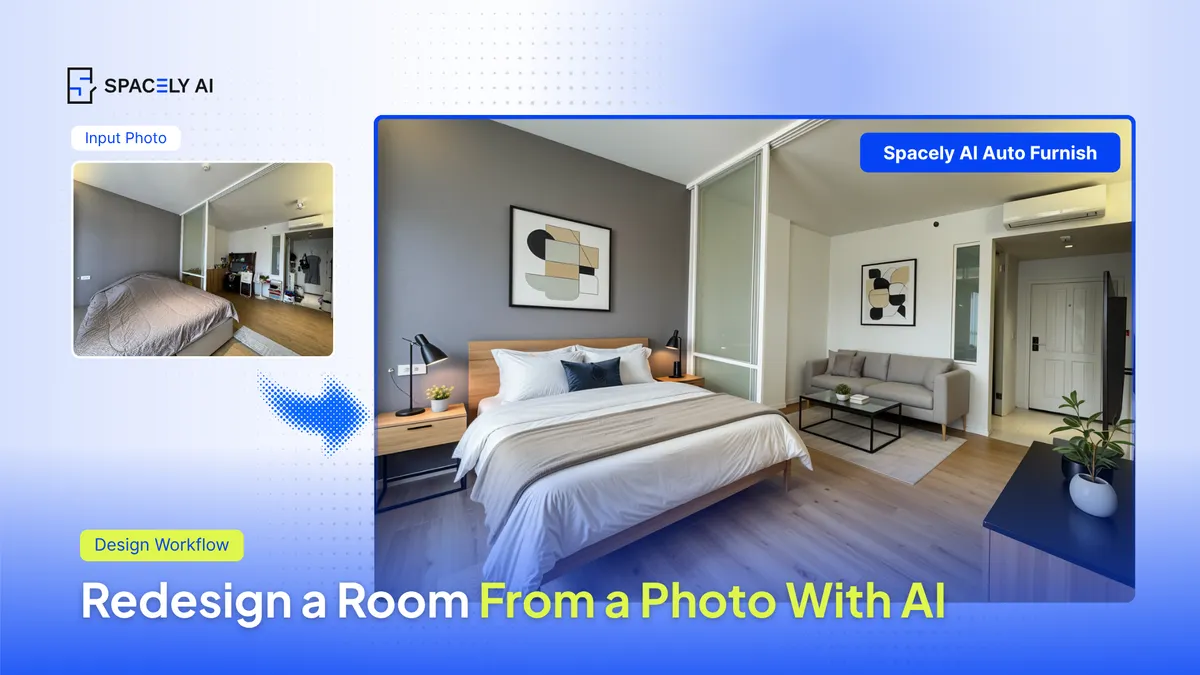
Can AI redesign a room from a photo? Yes — upload an image, pick a style, and get photorealistic renders in about 60 seconds with Spacely AI. Here's how. You upload an image, choose a style, and a generative AI tool returns furnished, photorealistic versions of your space — no 3D modeling, no prompt writing. Spacely AI does exactly this: snap or upload a room photo, pick a look, and get client-ready renders in about 60 seconds. What used to take days now takes minutes.
Different people use it for the same reason — to see a space before committing to it. Homeowners test ideas before paying for a renovation. Designers show clients options without booking a render house. Real estate agents furnish empty listings.
You can start free: Spacely AI gives trial credits with no credit card, enough to redesign several rooms before deciding to upgrade. The technology is best for early-stage visualization, not construction drawings. But for deciding what a room should become, going from photo to render is now a few-minute task.
How do you redesign a room from a photo, step by step?
The output depends almost entirely on your input photo. Better input, sharper render.
- Capture the room. Shoot in daylight, straight-on, with the whole space in frame. Blurry or dim photos produce weaker results.
- Choose a style. Pick a preset (modern, Japandi, industrial) or upload a reference photo to transfer its mood.
- Generate. Spacely AI returns photorealistic options in roughly 60 seconds.
- Edit specifics. Use Point & Edit to change one object — a sofa, a light fixture — without restarting the whole render.
- Finalize. Upscale to 4K with Enhance Quality for presentation or printing.
That visualization step matters more than it sounds. It gives anyone — not just sellers — the "see it before you commit" advantage in under a minute. And because you keep control over every edit, redesigning a room from a photo is no longer a specialist task.
How does AI redesign compare to staging and outsourced renders?
The old options are slow or expensive. AI redesign collapses both the cost and the timeline — and the real win is iteration. You can try five directions (Japandi, mid-century, warm minimal) and compare them side by side before committing a dollar to paint or furniture.
| Approach | Typical cost | Turnaround | Best for |
|---|
| AI redesign (Spacely AI) | Free to start (30 credits) | ~60 seconds | Early visualization, comparing styles, client options |
| Physical staging | ~$2,000–$3,200 | Days to weeks | Occupied or luxury homes |
| Outsourced render | ~$150 per image | ~24–48 hours | One-off final presentation visuals |
Physical staging averages roughly $2,000–$3,200 per the Real Estate Staging Association and NAR data — worthwhile for some listings, but hard to justify when you only need to decide on a direction. For that decision, AI redesign is the fastest path there is.
source: Home Staging Statistics — The Zebra — physical staging cost range (drawn from RESA and NAR data). Costs vary by market; confirm local figures before publishing.
FAQ
Can I redesign my room from just a phone photo? Yes. A clear, well-lit phone photo is enough for an AI room design from a photo. Spacely AI accepts standard room photos and returns photorealistic redesigns in about 60 seconds — a straight-on angle and good lighting produce the sharpest results.
Is AI room design free? You can start free. Spacely AI offers trial credits with no credit card, which is enough for a room design session that covers several rooms or a room design from photo across multiple styles. Watch for tools that watermark free outputs; Spacely AI's Studio and Business plan is watermark-free with a commercial license.
How accurate is an AI room redesign? It's accurate for visualization and style decisions, not for construction. An AI room redesign shows how a space could look and feel, which is ideal for early planning. For exact dimensions and build documentation, pair the concept render with traditional measurement and drawings.
Get started
→ Create your free account
→ Watch the full tutorial on YouTube
→ Explore the full toolkit
For more information and media inquiries, please contact
Website: spacely.ai
Facebook: facebook.com/spacelyai
Instagram: instagram.com/spacely.ai
Email: [email protected]