Spacely AI for SketchUp: The Complete Rendering Workspace, Inside Your App
Paphada Vasinsittisuk··3 min read
For architects, interior designers, and 3D modelers, SketchUp isn't just a tool — it's the environment where projects live. Models get built, refined, and presented in SketchUp. Asking designers to leave SketchUp to render their work has always introduced friction: export the file, switch applications, configure settings, render, download, and bring the result back into the workflow.
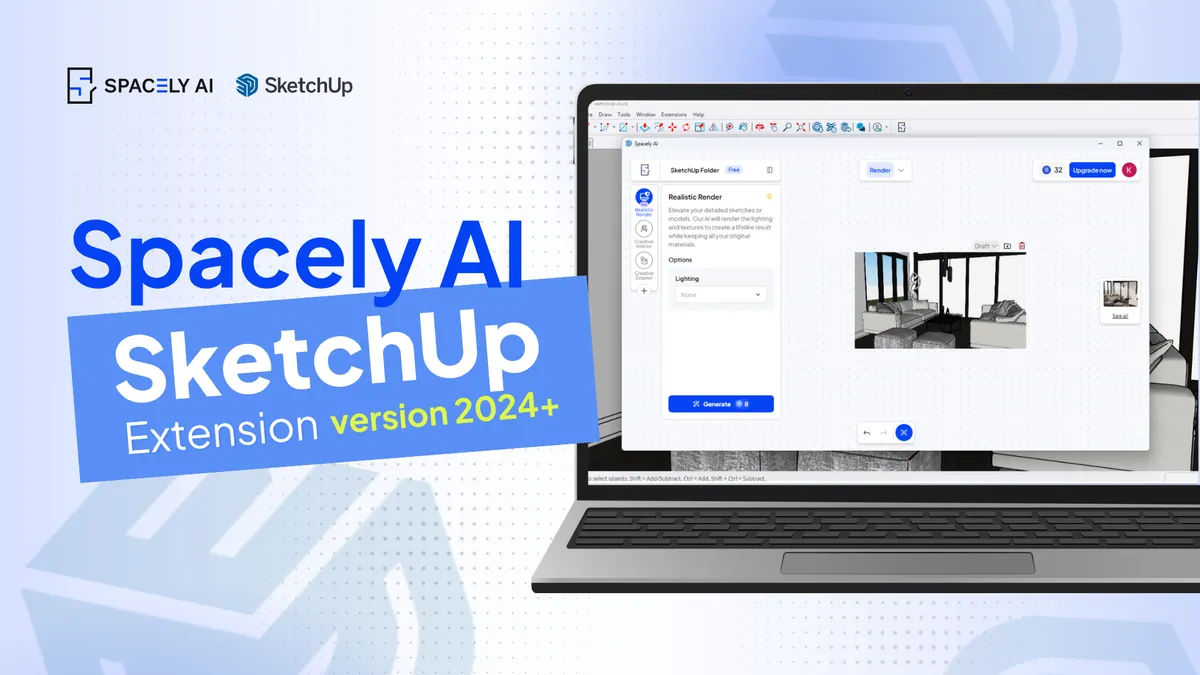
Spacely AI's SketchUp Extension was built to remove that friction. This update makes it the most complete SketchUp integration in the AI rendering category.
Sign in — Create a free account at spacely.ai and trial credits. No credit card required. Already have an account? Log in, copy your Authentication Code from Settings, and enter it in the Spacely AI panel inside SketchUp.
Generate — Open any model. Select a tool from the Spacely AI panel, capture your 3D scene, and generate. Your render appears instantly and saves to your SketchUp Project Folder automatically.
Refine and deliver — Use Point & Edit to adjust elements. Apply Lighting Transfer for atmosphere. Enhance to 4K for client presentations. All inside SketchUp.
Beyond the new tools and SketchUp 2024+ support, this update includes infrastructure improvements:
Faster model synchronization — large models with high polygon counts sync to Spacely AI faster, with less lag during the initial connection.
Improved connection stability — long working sessions no longer drop the connection mid-render. The extension maintains a persistent link to your Spacely AI account throughout the SketchUp session.
Better OTP sign-in reliability — the email-based one-time password sign-in (introduced in Q1 2026) now works consistently across major email providers.
The extension now officially supports SketchUp 2024 and all newer versions.
For users on older versions of SketchUp: the previous extension version remains available, you can access the new toolkit and improvements via Spacely AI browser. We strongly recommend updating SketchUp itself to access the full feature set.
Why we built it this way
Architects, interior designers, and 3D modelers spend more time in SketchUp than in any other application. The principle: meet professionals inside the tools they already use, not outside them.
The SketchUp Extension is now the most direct expression of that principle in our product. The same workspace, the same project folders, the same tools — accessible without leaving the application where the work actually happens.
This is what workflow integration looks like.
FAQ
Q: Does the SketchUp Extension require a Spacely AI subscription? A: A free Spacely AI account works for basic rendering modes (Creative Render, Style Transfer). Studio and Business plans unlock the full toolkit including Realistic Render, Enhance Quality 4K, and Auto Furnish at full quality.
Q: Will the extension work on SketchUp 2023 or older? A: The previous extension version still works on older SketchUp builds, but the new toolkit and improvements require SketchUp 2024 or newer. We recommend updating SketchUp to access the full feature set.
Q: Are renders generated in SketchUp saved to my Spacely AI workspace? A: Yes. Every render generated via the extension automatically saves to your Spacely AI Project Folders. Access them from the web app, from the extension, or from any device signed into your account.
Q: Does the extension change my SketchUp model? A: No. Renders are generated based on your model views but don't alter the underlying SketchUp file. Your model stays exactly as you built it.
The pace of design has changed. Team Canvas brings your whole team onto one live render in Spacely AI: real-time edits, comments, and shared credits.
Real-time…
Spacely AI for AutoCAD turns your design into a client-ready render without leaving the tool. See how it works, how to get early access, and what it does today.…
Spacely AI for Revit is coming. Render photorealistic visuals straight from your Revit 3D views, no export round-trip. Join the waitlist for early access.
It b…