Transform Your Space with Spacely AI's New Color Transfer Feature
Nook Supakorn··2 min read
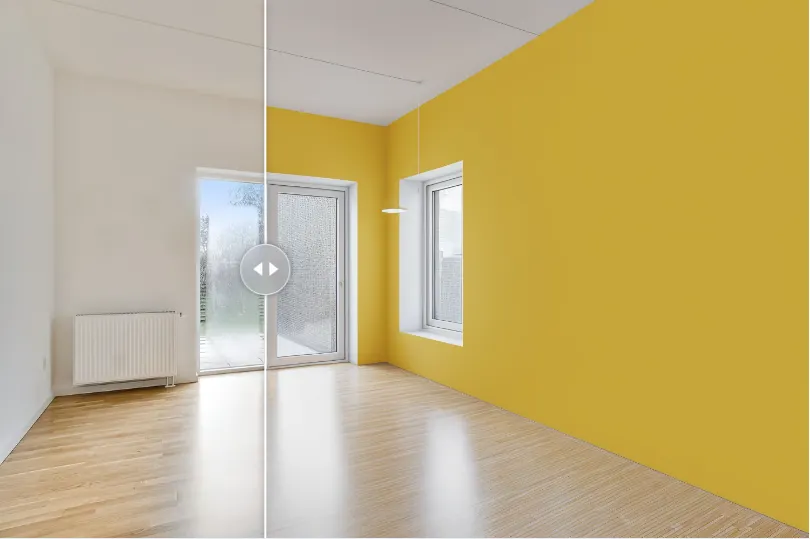
Change wall color
We are thrilled to introduce a game-changing feature to Spacely AI that will redefine how you visualize and customize your living spaces. Say hello to our new Color Transfer feature! Now, you can easily upload a photo of your room, select specific areas like the floor, walls, or ceiling, choose your desired colors, and see the transformation instantly. Whether you're planning a renovation or just exploring new design ideas, this feature is designed to make the process seamless and fun.
The Power of Color in Interior Design
Color is one of the most impactful elements in interior design. It can influence mood, create a sense of space, and reflect your personality. However, imagining how a new color will look in your room can be challenging. That's where Spacely AI's Color Transfer feature comes in. It allows you to experiment with different colors and see the results in real-time, giving you the confidence to make the right choices.
How It Works
0:00
/1:02
Step 1: Upload Your Room
Start by uploading a photo of your room. Our advanced AI technology will analyze the image and prepare it for customization.
Step 2: Select Areas to Change
Next, select the areas you want to change. Whether it's the floor, walls, or ceiling, our intuitive interface makes it easy to highlight these sections with precision.
Step 3: Choose Your Colors
Once you've selected the areas, it's time to choose your colors. With a vast palette at your fingertips, you can explore endless combinations to find the perfect match for your vision.
Step 4: Generate Your New Look
After selecting your colors, simply click the 'Generate' button. In seconds, you'll see your room transformed with the new colors. The realistic rendering helps you visualize the final result with stunning accuracy.
Why You'll Love It
Easy to Use: The user-friendly interface ensures a smooth and enjoyable experience.
Real-Time Results: Instant rendering lets you see the impact of your choices immediately.
Endless Possibilities: Experiment with a wide range of colors to find the perfect fit for your space.
Professional Quality: Achieve realistic and high-quality visuals that help you make informed decisions.
Real-Life Applications
Whether you're a homeowner planning a renovation, an interior designer working on a project, or just someone who loves to experiment with home decor, the Color Transfer feature is a valuable tool. It helps you save time, avoid costly mistakes, and ultimately create a space that you love.
Get Started Today!
Ready to transform your space? Head over to Spacely AI and try our new Color Transfer feature today. Discover the endless possibilities and bring your interior design ideas to life with just a few clicks.
Conclusion
At Spacely AI, we're committed to making interior design accessible and enjoyable for everyone. Our new Color Transfer feature is just one of the many ways we're helping you create beautiful, personalized spaces. Stay tuned for more exciting updates, and happy designing!
Transform your space, unleash your creativity, and make your home truly yours with Spacely AI's Color Transfer feature. Try it now and experience the future of interior design.
Feel free to share your feedback and let us know how this feature has helped you create your dream space. We can't wait to see your amazing transformations!
The pace of design has changed. Team Canvas brings your whole team onto one live render in Spacely AI: real-time edits, comments, and shared credits.
Real-time…
Spacely AI for AutoCAD turns your design into a client-ready render without leaving the tool. See how it works, how to get early access, and what it does today.…
Spacely AI for Revit is coming. Render photorealistic visuals straight from your Revit 3D views, no export round-trip. Join the waitlist for early access.
It b…