Ten copy-and-paste interior design AI prompts for living rooms, kitchens, bedrooms, and more — plus the simple formula to write your own in Spacely AI.
A good interior design AI prompt names five things: the room, the style, the key furniture and materials, the color palette, and the lighting — then ends with a quality cue like "photorealistic." The more specific each part, the closer the render matches what you pictured.
Below are 10 copy-and-paste prompts for common rooms and styles, written for Spacely AI. Paste any of them into Realistic Render, swap in your own details, and generate a photorealistic result in about a minute.
The prompts cover living rooms, bedrooms, kitchens, home offices, bathrooms, and outdoor spaces, plus one editing prompt for changing a room's style without starting over. Each is built on the same formula, so once you see the pattern you can write your own. You don't need perfect wording, just clear and concrete details.
What makes a good interior design AI prompt?
The strongest prompts follow one structure. Fill each slot with something specific:
| Slot |
Weak |
Specific |
| Room |
"a room" |
"a small north-facing bedroom" |
| Style |
"modern" |
"Japandi" or "warm minimalism" |
| Furniture & materials |
"nice furniture" |
"low platform bed, rattan pendant, oak nightstands" |
| Color palette |
"neutral" |
"cream, oatmeal, and rust" |
| Lighting |
"good lighting" |
"soft morning light through sheer curtains" |
| Quality cue |
— |
"photorealistic, professional interior photography" |
Put them in that order and you have a prompt that renders close to your intent on the first try.
Key Takeaway: Vague prompts ("a nice modern living room") give generic results; specific prompts ("oatmeal linen sectional, walnut coffee table, warm oak floors, soft afternoon light") give you precision.
10 interior design AI prompts you can copy and paste
Paste these into Realistic Render, then change the details to fit your project.
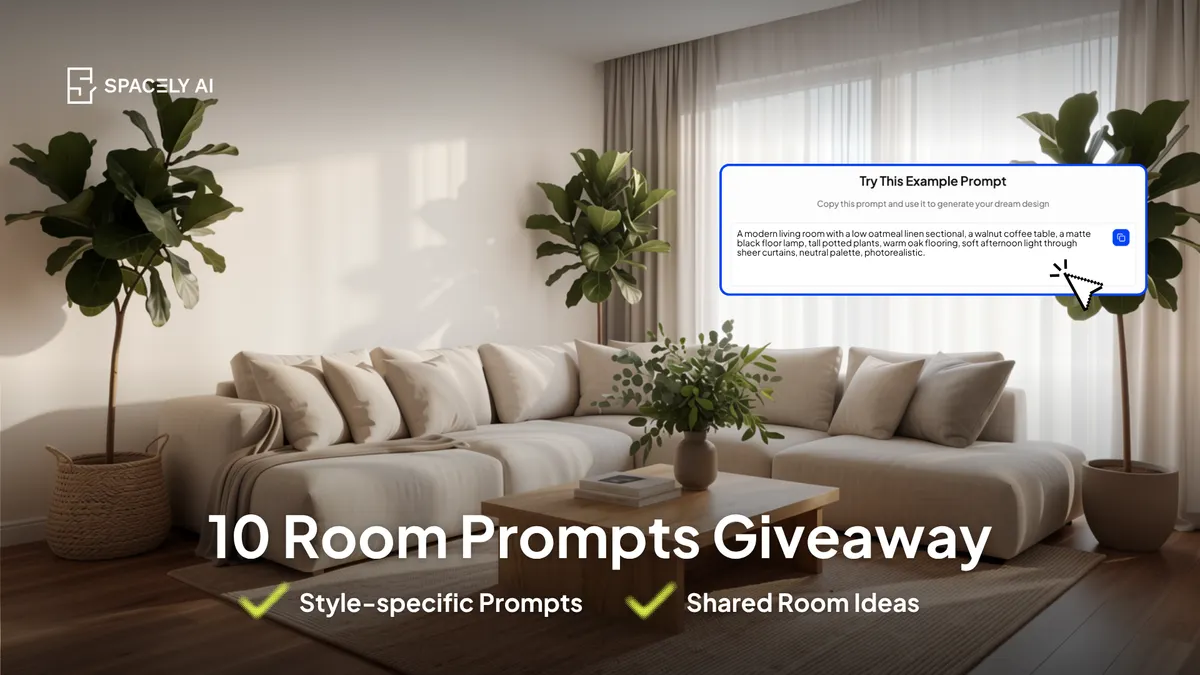
1. Modern living room
A modern living room with a low oatmeal linen sectional, a walnut coffee table, a matte black floor lamp, tall potted plants, warm oak flooring, soft afternoon light through sheer curtains, neutral palette, photorealistic.
2. Cozy small bedroom (Japandi)
A small cozy bedroom with a low platform bed, layered cream and rust textiles, a rattan pendant light, a reading nook by the window, warm ambient lighting, Japandi style, calm and inviting, photorealistic.
3. Scandinavian kitchen
A bright Scandinavian kitchen with white shaker cabinets, light oak open shelving, white quartz countertops, brass hardware, a small round dining table, natural daylight, minimal and airy, photorealistic.
4. Mid-century home office
A focused home office with a solid walnut desk, an ergonomic chair, floating shelves with books and plants, warm task lighting, muted sage walls, mid-century modern style, calm and productive, photorealistic.
5. Spa-style bathroom
A spa-like bathroom with a freestanding stone tub, large-format matte tiles, a warm wood vanity, soft recessed lighting, greenery, an earthy neutral palette, serene and clean, photorealistic.
6. Industrial loft living room
An industrial loft living room with exposed brick, black steel-framed windows, a tan leather sofa, polished concrete floors, warm pendant lighting, tall ceilings, moody and warm, photorealistic.
7. Elegant dining room
An elegant dining room with a marble-top table, upholstered dining chairs, a sculptural pendant light, floor-to-ceiling drapes, soft gold accents, refined and sophisticated, photorealistic.
8. Outdoor patio (use Landscape Render)
A modern outdoor patio with a low weatherproof sectional, a round fire pit, string lights overhead, potted olive trees, warm evening light, relaxed and inviting, photorealistic.
9. Coastal living room
A coastal living room with a slipcovered white sofa, natural jute rug, light driftwood accents, linen curtains, a soft blue-and-sand palette, bright airy daylight, calm and breezy, photorealistic.
10. Change a room's style (use Point & Edit or Style Transfer)
Keep the same layout and furniture, but change the style to warm minimalism with lighter wood tones, cream textiles, and softer daylight.
How do you adapt these prompts to your own room?
Start from the prompt closest to your project, then edit three slots first: the furniture and materials, the palette, and the lighting. Those three change the result the most. Keep the room type and quality cue as they are. If the first render is close but not right, don't rewrite the whole prompt — use Point & Edit to adjust one element (a sofa color, a light fixture) while keeping everything else. That's faster than regenerating, and it keeps the parts you liked.
The bottom line
The best interior design AI prompts are specific, not clever. Name the room, style, furniture, palette, and lighting, add "photorealistic," and you'll get a client-ready result. Copy one of the 10 above, swap in your details, and refine with Point & Edit. Once you've used the formula a few times, you'll write your own without thinking about it.
FAQ
What is the best prompt for AI interior design?
There's no single best prompt — the best one is specific to your room. A strong prompt names the room, style, furniture and materials, color palette, and lighting, then adds "photorealistic." In Spacely AI, paste that into Realistic Render and refine the result with Point & Edit.
How long should an interior design AI prompt be?
One to two sentences is usually enough. You want enough detail to name the style, key materials, palette, and lighting, but not so much that the ideas compete. If a render misses, adjust one detail rather than adding more or fix it directly with Spacely AI's Point & Edit.
Can I use the same prompt for different rooms?
Yes, with small edits. Keep the structure and change the room type, furniture, and palette. For example, the Scandinavian kitchen prompt becomes a Scandinavian bedroom by swapping the cabinets and countertops for a bed and nightstands. Spacely AI renders each in about a minute, so testing variations is quick.
More design insights on the Spacely AI blog →
Get started
→ Create your free account
→ Watch the full tutorial on YouTube
→ Explore the member plan
For more information and media inquiries, please contact
Website: spacely.ai
Facebook: facebook.com/spacelyai
Instagram: instagram.com/spacely.ai
Email: [email protected]