How to write architecture prompts for AI renders; the structure that keeps results faithful to your design, with example prompts for facades, interiors, and aerials.
A good architecture prompt names five things: the form, the materials, the light, the context, and the camera. Get those right and an AI render stays faithful to your design instead of drifting into a generic building. The single biggest factor, though, isn't the words — it's the starting point. When you render from your own model view (a framed shot from SketchUp, Rhino, or Revit), the geometry anchors the result, and the prompt directs everything else. That's why AI is most useful at the early-visualization stage, which is also where the profession reports using it most.
Below is the prompt structure that works for architecture, example prompts for common views, and the habits that keep results honest. Spacely AI renders from your model view and returns the result as a separate image, so your geometry stays untouched while you explore prompts freely.
How do you structure an architecture prompt?
Name the five elements, in plain terms, and stop before you overload it.
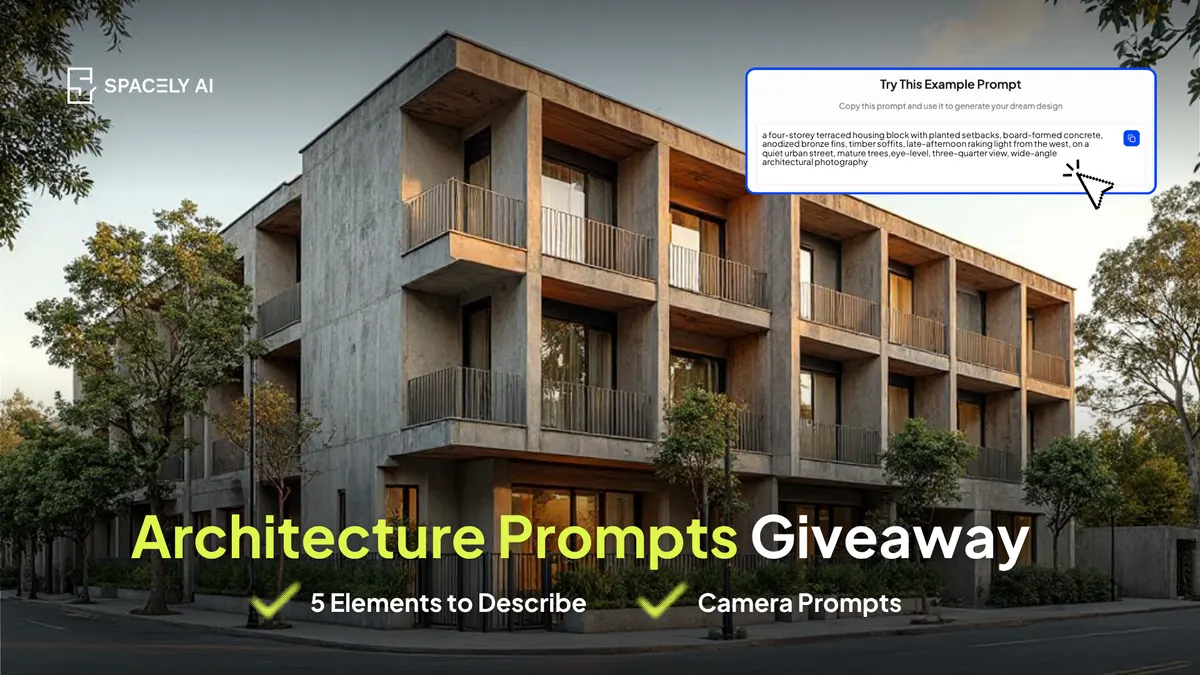
- Start with the building type and form ("a four-storey terraced housing block with planted setbacks").
- Add materials specifically ("board-formed concrete, anodized bronze fins, timber soffits").
- Set the light with a direction and time ("late-afternoon raking light from the west").
- Give the context ("on a quiet urban street, mature trees") so the building sits somewhere real.
- Finish with a camera cue ("eye-level, three-quarter view, wide-angle architectural photography").
Two to three sentences is plenty, more detail past that point tends to make the ideas compete.
What do vague and specific architecture prompts look like?
| Element |
Vague (reads generic) |
Specific (reads like your design) |
| Form |
"modern building" |
"four-storey terraced block with stepped planted setbacks" |
| Materials |
"nice cladding" |
"board-formed concrete, anodized bronze fins, timber soffits" |
| Light |
"good lighting" |
"late-afternoon raking light from the west, long shadows" |
| Context |
— |
"quiet urban street, mature street trees, wet pavement" |
| Camera |
"nice angle" |
"eye-level three-quarter view, wide-angle architectural photography" |
Which prompts are worth exploring for different views?
- For a facade study: "street-facing facade, board-formed concrete with vertical bronze fins, late-afternoon side light casting fin shadows, eye-level view."
- For an interior: "double-height timber-lined atrium, soft north light through clerestory glazing, people for scale, wide-angle interior photography."
- For an aerial / massing: "three-quarter aerial of a terraced housing block with planted roofs, soft overcast light, context of low-rise streets."
- For a section-perspective feel: "cutaway perspective showing stacked floor plates and a central stair, warm interior light, neutral background." Start each from your model view so the geometry holds.
The bottom line
Strong architecture prompts name form, materials, light, context, and camera — but the render is only as true as its starting point. Begin from your own model view, keep prompts to a sentence or two, and steer material and light rather than hoping the model invents your building. Explore freely: the render is a separate image, so your geometry never changes while you test ideas.
FAQ
What makes a good architecture prompt for AI?
Name the form, materials, light, context, and camera, in plain language, and keep it to two or three sentences. Most importantly, start from your own model view so the geometry anchors the result; a detailed prompt on a random reference still produces a generic building.
Why do my architectural AI renders look generic?
Usually because they start from a text prompt alone rather than your model, and because the prompt names a style instead of specific materials and light. Render from a framed model view and specify real materials, a light direction, and a camera angle.
Does prompting change my 3D model?
No, when you render from a model reference. Spacely AI uses your model view as the anchor and returns the render as a separate image, so you can explore prompts without altering your geometry.
More design insights on the Spacely AI blog →
Get started
→ Create your free account
→ Watch the full tutorial on YouTube
→ Explore the member plan
For more information and media inquiries, please contact
Website: spacely.ai
Facebook: facebook.com/spacelyai
Instagram: instagram.com/spacely.ai
Email: [email protected]