Copy-paste AI prompts for lounge colour schemes: warm neutrals, sage, deep navy, terracotta and more. See each colour on your own lounge walls before you commit.
The best way to choose a colour scheme for your lounge is to see it on your own walls first, and a good AI prompt lets you do exactly that. A lounge colour prompt names the colour scheme (the wall colour plus the palette around it), the key pieces like the sofa and rug, the mood, the light, and the camera — then you apply it to a photo of your actual lounge and see it in your real space and light, rather than guessing from a tiny paint chip.
Below are copy-paste prompts for the most popular lounge colour schemes; warm neutrals, sage green, deep navy, terracotta, greige, colour-drenched, and deep teal with how to adapt them to your room. Keep each prompt to a sentence or two: enough to steer the colour scheme, not so much that the ideas compete.
Start from a photo of your lounge, apply a prompt, and if one element comes out wrong, fix just that with Point & Edit rather than starting again. Every prompt below is written to render on your own space.
What makes a good lounge colour prompt?
Name the scheme, not just a single colour. A colour scheme is a wall colour plus everything around it, so a good prompt describes the whole palette: the wall colour, the sofa and larger pieces, the flooring, and the accents that tie it together.
Add the mood, the light, and a wide camera angle so you can see the whole lounge. Being specific about the palette is what turns a flat result into a scheme you could actually live with.
| Element | Vague (renders flat) | Specific (reads real) |
|---|
| Wall colour | "a nice colour" | "warm sage green walls" |
| Palette | "matching things" | "oatmeal linen sofa, oak floor, cream cushions" |
| Mood | "cosy" | "calm and cosy, layered textures" |
| Light | "bright" | "soft afternoon light" |
| Camera | — | "eye-level, wide-angle" |
Which lounge colour prompts can you copy?
Pick the scheme closest to what you're after and adjust the pieces to your room.
- Warm neutral lounge:
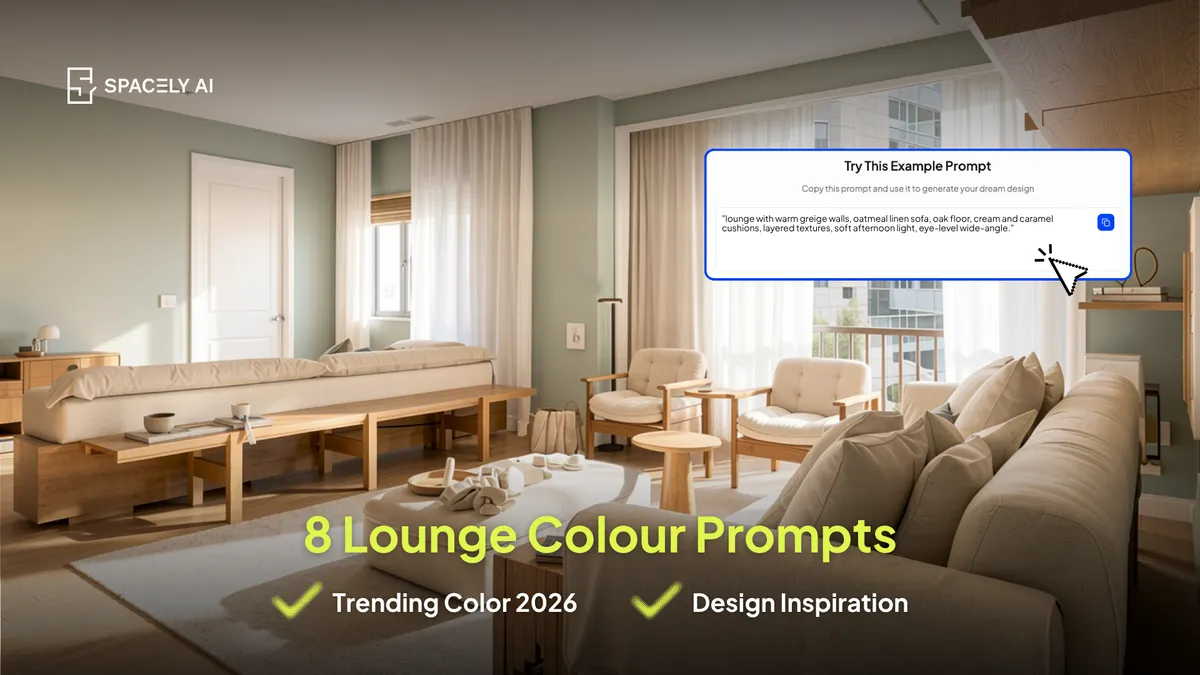
"lounge with warm greige walls, oatmeal linen sofa, oak floor, cream and caramel cushions, layered textures, soft afternoon light, eye-level wide-angle."
- Sage green lounge:
"lounge with soft sage green walls, natural linen sofa, oak and rattan accents, cream rug, plants, calm and airy, soft daylight, wide-angle."
- Deep navy lounge:
"lounge with deep navy walls, mid-grey sofa, brass accents, warm oak floor, layered cushions, cosy and intimate, warm lamp light, evening, eye-level."
- Terracotta / clay lounge:
"lounge with warm terracotta walls, cream sofa, rust and ochre cushions, oak furniture, earthy and warm, bright natural light, wide-angle."
- Greige / quiet-luxury lounge:
"quiet, elevated lounge in warm greige and mushroom, boucle sofa, oak and brass accents, tonal cushions, refined and calm, soft daylight, eye-level."
- Colour-drenched lounge:
"lounge colour-drenched in muted olive across walls, trim and ceiling, tonal sofa and cushions, warm wood accents, enveloping and cohesive, warm light, wide-angle."
- Deep teal lounge:
"lounge with deep teal walls, warm caramel leather sofa, brass and oak accents, cream rug, rich and cosy, warm lamp light, eye-level."
- Soft monochrome lounge:
"lounge in soft tonal beige and off-white, cream sofa, textured neutrals, oak floor, calm and light, bright daylight, wide-angle."
How do you refine a lounge colour render?
Change one thing, keep the rest If the scheme is nearly right but the sofa's the wrong tone or the walls a shade off, use Point & Edit on that element and leave everything else; quicker than regenerating, and it protects what already works.
Render two or three schemes, set them side by side, and keep the one that suits your room. Because you started from a photo of your own lounge, you're comparing colours in your real space and light, not a showroom.
The bottom line
Choosing a lounge colour is far easier when you can see the whole scheme on your own walls first. Name the wall colour and the palette around it, add the mood, light, and camera, and apply it to a photo of your actual lounge. Try warm neutrals, sage, deep navy, terracotta, or a colour-drench, compare a few side by side, and refine the winner with Point & Edit. You'll paint once, having already seen the colour at full scale in your own room.
FAQ
How do you choose a colour scheme for a lounge? Name the whole scheme, not just one colour which includes the wall colour, the sofa and larger pieces, the flooring, and the accents; then consider your light and room size. North-facing lounges suit warmer undertones, brighter rooms can carry deeper colours. Test your shortlist on a photo of your actual lounge before buying, so you see the full scheme in your own light.
Can AI show a colour on my lounge walls before I paint? Yes. Upload a photo of your lounge to Spacely AI and apply a colour prompt, or change the wall colour directly with Point & Edit. It shows the shade on your actual walls, in your room's light — far more reliable than a paint chip — so you can compare a few schemes and commit once.
What are the most popular lounge colours right now? Warm, grounded tones lead such as warm greige and mushroom, soft sage green, deep navy, terracotta, and deep teal with creamy warm whites as a light, airy option. The overall direction is warmth and depth over cool greys and stark white. Choose the version that suits your room's light and the mood you want.
More design workflow insights on the Spacely AI blog →
Get started
→ Create your free account
→ Watch the full tutorial on YouTube
→ Explore the member plan
For more information and media inquiries, please contact
Website: spacely.ai
Facebook: facebook.com/spacelyai
Instagram: instagram.com/spacely.ai
Email: [email protected]